
From Approved Draft to Published Content
A practical content-operations playbook for teams that publish at scale
A reliable publishing workflow should preserve the details writers intended without asking an editor to rebuild the article inside a CMS. This sample document is deliberately structured to demonstrate headings, emphasis, links, lists, tables, quotations, code, and images in one controlled workflow.
Tools such as Tenwrite help teams move approved content from Google Docs into publishing systems while keeping the document useful as the source of truth.
Why copy-paste becomes an operations problem
Copy-paste feels harmless when a team publishes one article. Across multiple writers, reviewers, and websites, it becomes a repeatable source of publishing errors.
- Structure: headings can become oversized paragraphs or inconsistent HTML.
- Media: images may remain attached to temporary URLs instead of the destination media library.
- Metadata: titles, descriptions, slugs, labels, and publishing can be re-entered incorrectly.
- Ownership: nobody can easily tell which document produced the published page.
- Scale: the same manual handoff must be repeated for:
- different client websites,
- multiple publishing destinations, and
- scheduled editorial queues.
A repeatable publishing workflow
- Write: create the article in Google Docs using normal document styles.
- Review: collect comments, resolve changes, and mark the draft approved.
- Route: choose the destination site, post type, status, and publishing method.
- Publish: transfer the body, media, formatting, links, and metadata together.
- Measure: bring finalized search-performance context back beside the managed content.
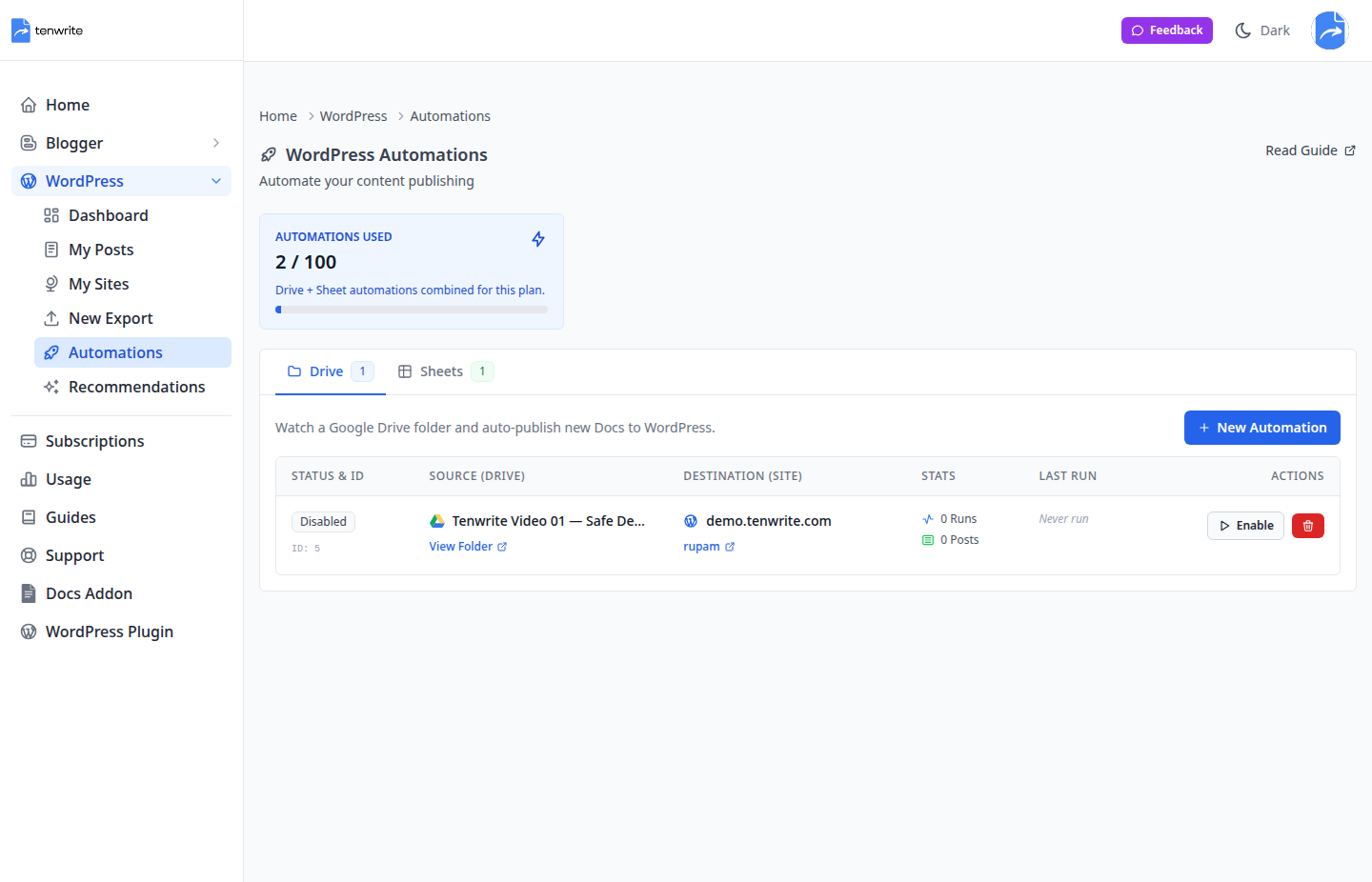
Figure 1. A Drive automation turns an approved folder into a controlled publishing source.
What should survive the handoff
The destination should receive useful structure—not a flattened wall of text and not a pile of theme-breaking styles.
| Element | In the source document | At the destination |
|---|---|---|
| Headings | Document heading styles | Semantic, editable heading blocks |
| Emphasis | Bold, italic, underline, and colour | Intent preserved without unnecessary clutter |
| Links | Descriptive linked text | Clean, clickable URLs |
| Media | Inline images and captions | Managed, reusable assets |
| Lists and tables | Structured information | Editable content blocks |
A useful rule for SEO teams
Publishing is not complete when the draft leaves Docs. It is complete when the destination is accurate, reviewable, and measurable.
That means retaining the article’s structure while also keeping the SEO handoff understandable. A descriptive link such as explore the Tenwrite publishing workflow is more useful than pasting a raw URL into the middle of a paragraph.
Example content contract
A small semantic example makes the expected output easy to discuss with editors and developers:
A meaningful section heading
A paragraph with clear emphasis and a useful link.
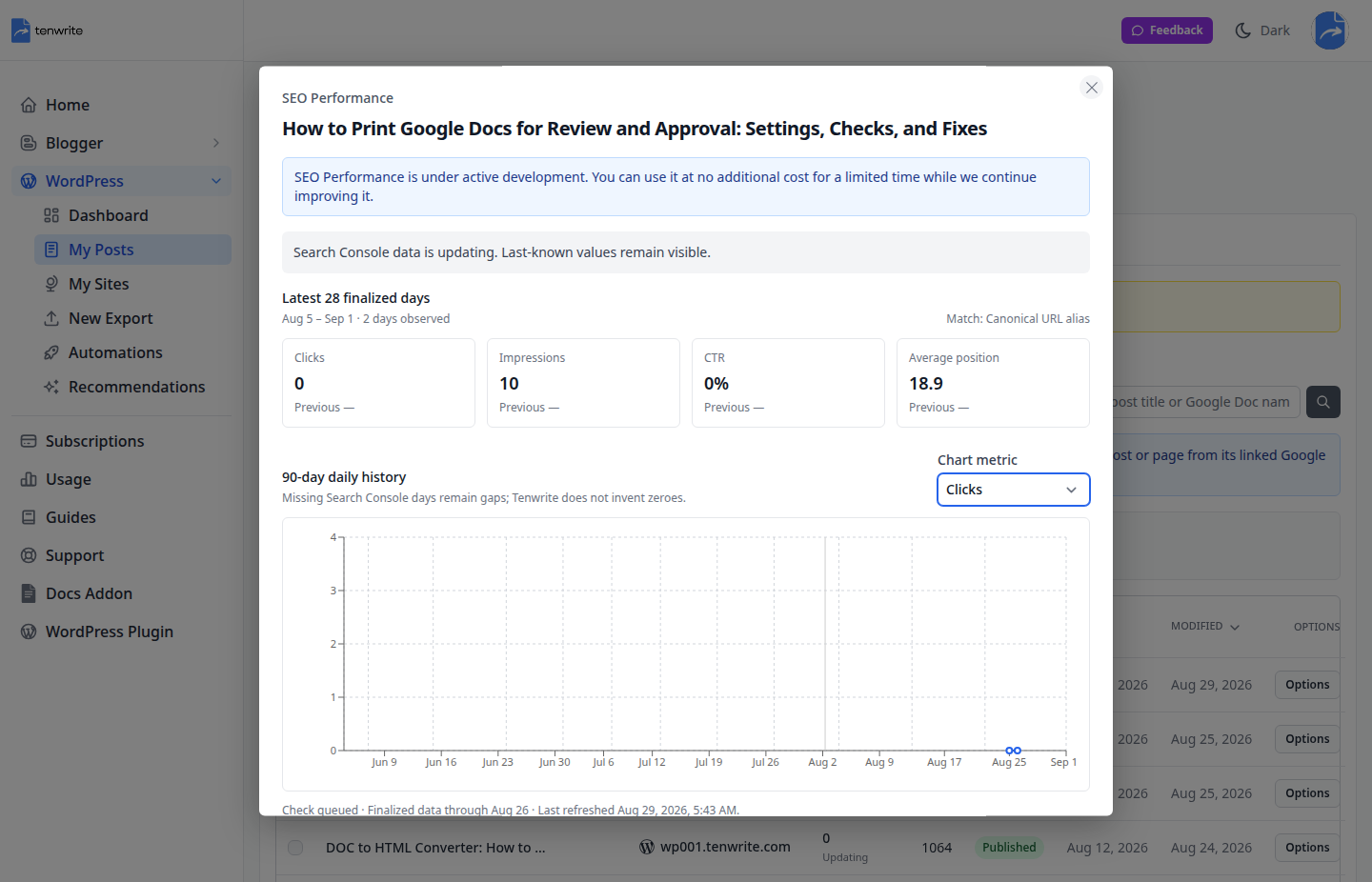
Figure 2. Finalized performance context stays close to the content the team manages.
The agency version
Agency workflows add one more requirement: the same process must remain understandable when several clients, sites, and contributors are involved.
- Standardize the source
- Use an approved Drive folder.
- Use a predictable document-naming pattern.
- Keep editorial decisions inside the source document.
- Control the destination
- Confirm the site and content type before publishing.
- Choose draft, scheduled, or published status deliberately.
- Return useful evidence
- Keep the source document linked to the destination content.
- Review finalized search data without inventing missing values.
When to automate
Automate the stable, repetitive parts of the process. Keep judgment-heavy work—approval, final positioning, and exceptions—visible to a person.
Pre-publish checklist
- ☐ The title and heading hierarchy describe the article accurately.
- ☐ Images are intentional, readable, and placed beside the relevant copy.
- ☐ Links use descriptive anchor text.
- ☐ Lists and tables improve scanning instead of adding decoration.
- ☐ The destination site, content type, and status have been confirmed.
- ☐ The approved Google Doc remains the traceable source.
Final takeaway
A good content workflow does more than move text. It preserves structure, intent, context, and media while reducing the number of manual decisions required at publish time.
One approved document. One controlled handoff. One traceable result.
That is the workflow this demonstration is designed to test. Learn more at tenwrite.com.
Try the complete publishing flow
Use this playbook to follow an approved article from its source document to a published post, then update and measure it from the same workspace.
- Connect the destination. In Tenwrite, open My Sites and connect your WordPress site or Blogger blog.
- Select the source. Open WordPress → New Export or Blogger → New Export, choose the destination, and select this Google Doc through the Drive picker.
- Carry the metadata with the draft. The frontmatter table at the top of this document defines its title and publishing settings. Tenwrite reads the table and removes it from the exported article. Supported WordPress SEO fields require the Tenwrite plugin on a self-hosted site.
- Choose the output. Use Gutenberg blocks or Classic HTML for WordPress. For Blogger, use its HTML output and set labels in the export form. Here, embed_youtube = true in frontmatter enables video conversion; the same option is available in Advanced Options.
- Export and review. This example uses status = draft for the first review. Check headings, the content table, images, animation and video playback at the destination. When ready to go live, change the frontmatter status to publish before exporting or syncing.
- Update the existing post. Edit a sentence in this Google Doc, then use Sync Post for its linked item in My Posts. Confirm that the existing destination post reflects the change.
- Measure the published content. Connect Google Search Console in My Sites → Site Settings, then open SEO Tracker. Review impressions, clicks, CTR, average position and available previous-period comparisons. Finalized search data refreshes daily and may arrive with a reporting delay.
Media examples: animation and video
A publishing demo should include the media readers will actually see. This section combines an inline animated image with two linked YouTube videos.
An animated image that travels with the article
One approved document can reach readers around the world. The rotating globe below is an actual animated GIF, inserted as an image rather than pasted as a file link.

Figure 3. Animated media example. “Rotating earth (large)” by Marvel, based on NASA imagery; Wikimedia Commons, CC BY-SA 3.0. Image unchanged.
On supported paid plans, Tenwrite preserves animated media during export. Free-plan exports use a static image. Check the animation on the exported page, not just in the document preview.
Video 1: collaboration before publishing
Google Workspace’s short overview shows the shared writing and collaboration context behind an editorial workflow.
Google Workspace: A station for team collaboration — Google Workspace.
Video 2: the destination post
WordPress.com’s official tutorial demonstrates creating and managing a blog post. It complements the publishing handoff shown in this playbook.
Create a blog post — WordPress.com.
Keep each video link in its own paragraph. With Embed YouTube enabled, Tenwrite converts these linked URLs into embedded players during export. In Google Docs they remain links; the destination is where to check playback.
What to check in the exported post
- The frontmatter table is absent from the reader-facing article.
- Headings, emphasis, lists, quotations, the content table and descriptive links remain readable.
- Existing screenshots and the animated globe appear beside their captions.
- Both YouTube links become players when embedding is enabled and the destination allows embeds.
- The title, slug and supported metadata match the selected publishing settings.
- A later Sync Post updates the same linked post instead of creating a new one.
Write once. Publish deliberately. Keep the source and destination connected.
Leave a Reply